Figma Variables: The Quickest Way to Design Smarter, Not Harder
You know that phase in Figma where everything is fine until it’s not? You start with a clean file—frames, components, tidy layers. Fast forward a few design rounds and suddenly you’ve got buttons that don’t match, spacing that’s suspicious, and colors that definitely weren’t approved. Yep. Welcome to the moment you realise you need variables.
What are Figma Variables?
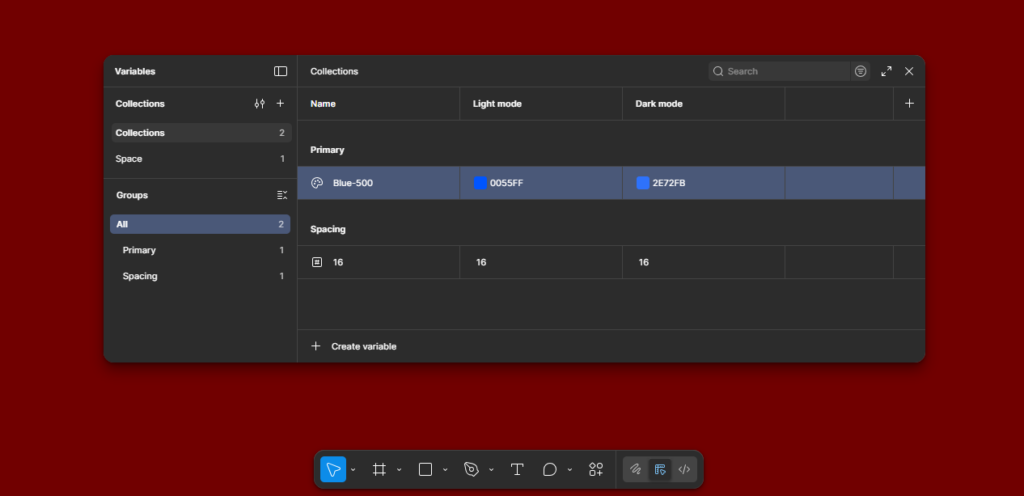
Think of variables as named, reusable values you can apply anywhere in your design.
Colors, numbers, strings, booleans—Figma lets you store all of these as variables and plug them into your components.
So instead of using #0055FF, you use Primary/Blue-500.
Instead of typing “16 px” again and again, you use Spacing/16.
Instead of making separate designs for day and night modes, you create modes, like:
- Light Mode
- Dark Mode
- High Contrast
- Brand A / Brand B
…and everything updates with a click.
Why You Should Actually Care
If you’re designing 2–3 screens, fine, maybe you don’t need variables.
But if you’re designing 40+ screens—or working on a team—variables stop being “nice to have” and become “please don’t torture yourself.”
Here are the benefits that make a real difference:
1. Consistency without thinking too much
Your spacing stays consistent.
Your colors stay consistent.
Your fonts stay consistent.
And you don’t have to remember anything—Figma remembers for you.
2. Faster design updates
Say the brand team decides to change the primary color.
Normally? You die inside.
With variables? You change it once. Everything updates automatically.
3. Easy theming
Light /Dark mode.
Brand A / Brand B.
Seasonal themes.
All handled using modes. No duplicate files, no duplicate components.
4. Smarter components
Variables also work inside component properties—so your design system becomes more flexible without creating 800 variants of a button.
Types of Variables You Can Create
Figma currently supports four types:
? Color Variables
For all your brand colors, UI colors, states, backgrounds, borders, shadows.
? Number Variables
Spacing, padding, corner radius, font sizes—anything numeric.
? String Variables
For text labels, button names, dynamic content.
? Boolean Variables
True/false conditions—super useful for toggles, states, showing/hiding elements.
What You Can Actually Do With Variables
Here’s how you’ll really use them while designing:
1. Build Smarter Design Systems
Your system becomes cleaner, more maintainable, and easier for teams to use.
2. Control Spacing with Tokens
Spacing tokens like:
4, 8, 12, 16, 20 …help your layout stay clean and balanced.
No more random 17px gaps.
3. Theming with Modes
Create:
- Light
- Dark
- High Contrast
Assign values for each mode. Switch the mode. Watch your entire UI update instantly.
Perfect for dashboards or apps with multiple UI states.
4. Property-Level Magic
Variables can be applied to:
- Fills
- Strokes
- Effects
- Width/height
- Corner radius
- Text content
- Visibility
So you’re not just styling—you’re controlling behavior.
A Quick Real-World Example

Imagine a button.
Normally, you’d create variants like:
- Default
- Hover
- Pressed
- Disabled
- Light theme
- Dark theme
With variables + modes:
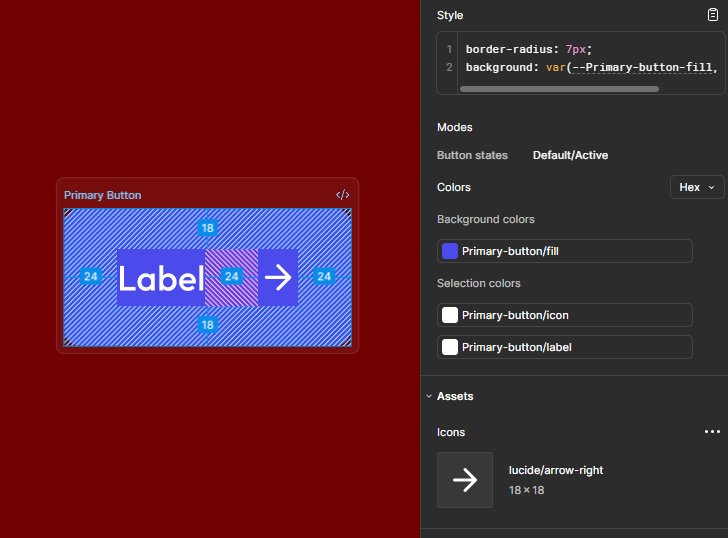
- You keep one button component.
- The fill, border, and text colors switch based on the active mode.
- States can be toggled using boolean variables.
Your design file stays tiny. Your workflow stays sane.
How Teams Benefit (a lot)
If you’re in a team, variables basically solve the entire “inconsistency” drama that happens every week.
- Developers get clean tokens
- Designers stay aligned
- Updates don’t break the entire design
- Everyone speaks the same visual language
Figma → Code transition becomes smoother because variables translate well into design tokens used in front-end frameworks.
So, When Should You Start Using Variables?
If you’re working on any project that has more than:
- one brand color,
- one button,
- one screen,
…then yes. Start now.
Variables aren’t just an advanced feature—they make your life easier. The earlier you implement them, the less refactoring you’ll do later.
Conclusion: Design Once, Reuse Everywhere
Figma Variables aren’t just another feature—they’re a workflow upgrade.
They bring order, consistency, and speed to your design process.
Once you get used to them, you’ll never go back to manual styling again.
If you’ve been putting off learning variables, consider this your sign.
Start small—colors, spacing—and slowly build your variable library.
If you’re looking to elevate your product’s user experience or need a team that can build thoughtful, scalable interfaces, Think201, a leading UI/UX design company in Bangalore, is here to help you design with purpose and consistency. Let’s build something users will love.
Written by Gomathi AB